QMAPI API DOCUMENTATION
Introduction
Welcome to the official engineering documentation of Qmapi
In the fast-paced world of business, market research is crucial. It shapes decisions, defines strategies, and drives success. But let’s be honest—traditional market research operations (MR Ops) are slow, rigid, and often get bogged down in inefficiencies. At qmapi, we’re not here to overpromise or revolutionize the world overnight. What we are doing is using technology to simplify MR Ops, making it more agile, scalable, and ultimately, more effective.
The Demand and Supply APIs provide a simple way to connect to millions of people and get answers in real time. By specifying a set of demographic qualifications and quotas, buyers can target a wide or very specific population on a topic of your choosing. As a supplier, you get fine grain control over your survey matching and business relationships on the platform. We want to encourage innovation with minimal limits. We ask that you please be practical and considerate when determining call frequencies. We rate limit when needed to protect the system and ensure the highest level of service to all of our clients, For More Information visit our QMAPI Website.
Are You New to Surveys & Market Research? For definitions of common terminology you may see in our documentation, read our Global Parameters
Authentication
Token-based authentication in the request Header is used by the API that is covered in this documentation. Clients must provide a token (given to them during integration) in the authorization Header of their HTTP requests in order to interact with the API endpoints and access protected resources. This token provides authenticated access to the features of the API and acts as a secure identity.
Client can safely authenticate their requests and confidently use the API's functionalities by conforming to this authentication protocol.
authorization: {{APIkey}}STATUS CODE
| Status Code | Status Text | Description |
|---|---|---|
| 200 | OK | The request has succeeded. The meaning of a success varies depending on the HTTP method: GET: The resource has been fetched and is transmitted in the message body. POST: The resource describing the result of the action is transmitted in the message body. |
| 201 | Created | The request has succeeded and a new resource has been created as a result of it. This is typically the response sent after a PUT request. |
| 400 | Bad Request | This response means that server could not understand the request due to invalid syntax. |
| 401 | Unauthorized | Authentication is needed to get requested response. This is similar to 403, but in this case, authentication is possible. |
| 403 | Forbidden | Client does not have access rights to the content so server is refusing to give proper response. |
| 404 | Not Found | Server cannot find the requested resource. | 500 | Internal Server Error | The server has encountered a situation it doesn’t know how to handle. |
| 502 | Bad Gateway | The server, while acting as a gateway or proxy, received an invalid response from an inbound server it accessed while attempting to fulfill the request. |
| 503 | Service Unavailable | The server is not ready to handle the request. Common causes are a server that is down for maintenance or that is overloaded. |
| 504 | Gateway Timeout | This error response is given when the server is acting as a gateway and cannot get a response in time. |
DEMAND API
Demand partners have an easy-to-use interface to submit their survey plans with the Demand API. This API enables demand partners to easily connect their survey plans into the ecosystem, supporting efficient data gathering and analysis procedures. It is designed to suit the changing requirements of market research initiatives.
Getting Started
Demand partners must first register for API access and receive authentication credentials in order to use the Demand API. After gaining authentication, they can use the given endpoints and data payloads to programmatically submit survey plans.
For detailed documentation on API endpoints, request and response formats, and authentication procedures, refer to the Demand API endpoints below.
We offer two convenient ways to create a survey
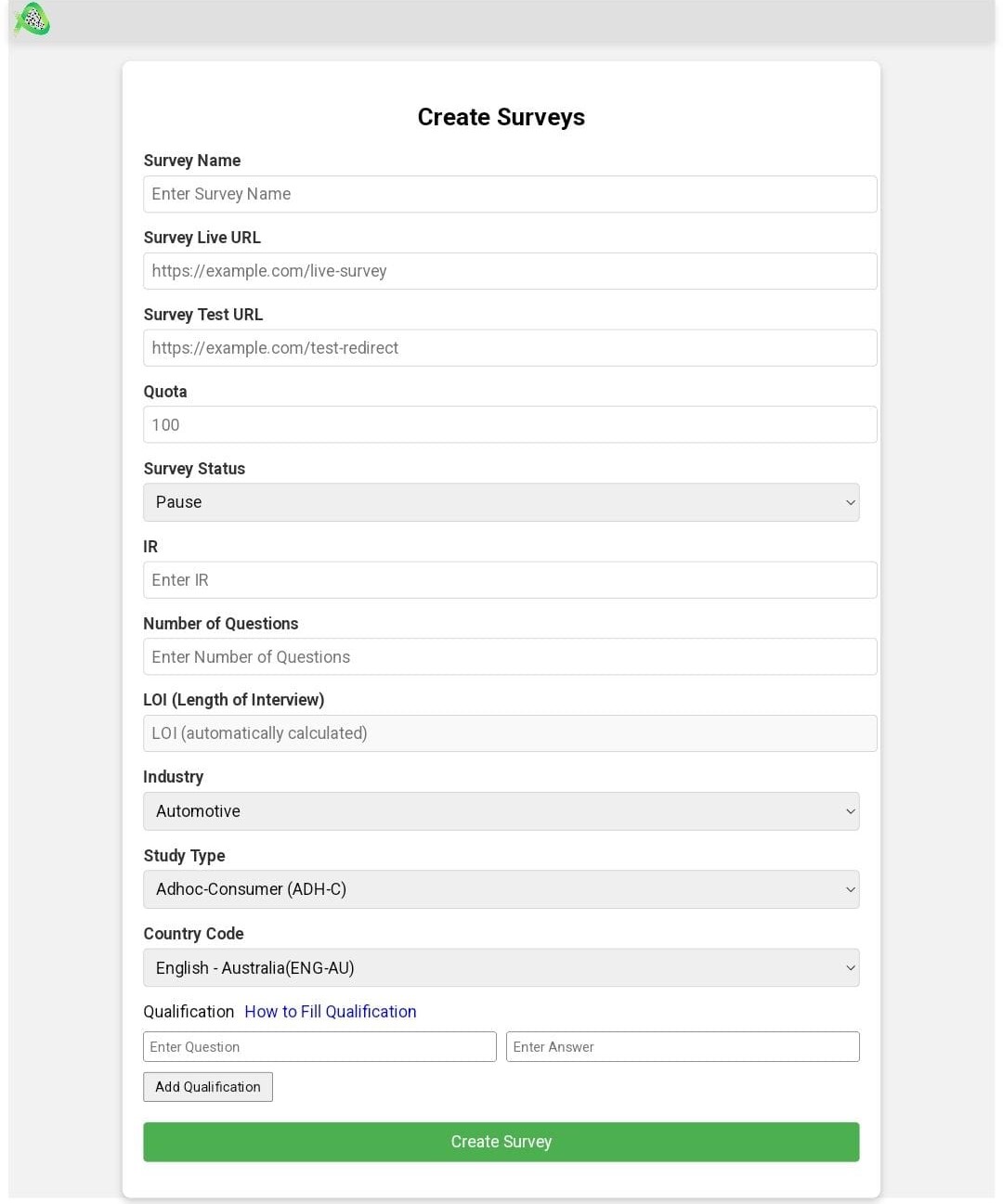
2.You can send an API request to create a new survey by providing the required details such as: project name, survey name, the number of completes, and the survey's status, and it will return the created survey details upon success.
https://api.qmapi.com/api/v1/survey/createParameters
| Name | Located in | Description | Required | Schema |
|---|---|---|---|---|
| id | body | Unique Account ID | Yes | string |
| projectName | body | Project name for the survey | Yes | string |
| CountryLanguageID | body | ID of the country and language for the survey | No | string |
| IndustryID | body | ID of the industry associated with the survey | No | integer |
| FID | body | Tracking ID for survey Creation | Yes | sub-Numeric |
| StudyTypeID | body | ID of the study type | No | integer |
| ClientCPI | body | Client cost per interview | No | decimal |
| ClientSurveyLiveURL | body | URL of the live survey | No | string |
| TestRedirectURL | body | URL for test redirects | No | string |
| IsActive | body | Specifies if the survey is active | No | boolean |
| Quota | body | Quota for the survey | No | integer |
| SurveyName | body | Name of the survey | No | string |
| status | body | Status of the survey | No | string |
| IR | body | Incidence rate | No | decimal |
| LOI | body | Length of interview | No | decimal |
| country | body | Country of the survey | No | string |
| endedAt | body | Survey end date | No | string |
| createdAt | body | Auto-generated creation timestamp | No | string (auto-generated) |
| updatedAt | body | Auto-generated update timestamp | No | string (auto-generated) |
Request Body
 {
  "projectName": "Market Research Project",
  "CountryLanguageID": 15,
  "IndustryID": 2,
  "StudyTypeID": 3,
  "ClientCPI": 5.0,
  "ClientSurveyLiveURL": "https://example.com/live-survey",
  "TestRedirectURL": "https://example.com/test-redirect",
  "IsActive": true,
  "Quota": 100,
  "SurveyName": "Consumer Behavior Survey",
  "FID": "VWxZOTSx",
  "status": "live",
  "IR": 20,
  "LOI": 15,
  "country": "US",
  "endedAt": "2024-12-31T23:59:59Z",
  "Quotas": [
    {
      "Name": "Age Group 18-24",
      "Quota": 100,
      "IsActive": true,
      "Conditions": [
        {
          "QuestionID": 21,
          "PreCodes": [1, 2, 3]
        }
      ]
    }
  ],
  "Qualifications": [
    {
      "QuestionID": 22,
      "PreCodes": [4, 5]
    }
  ]
}
Response Body
{
    "status": "success",
            "data": {
                "result": {
                    "id": 17,
                    "projectName": "Market Research Project",
                    "IndustryID": 2,
                    "StudyTypeID": 3,
                    "ClientCPI": 5,
                    "ClientSurveyLiveURL": "https://example.com/live-survey",
                    "TestRedirectURL": "https://example.com/test-redirect",
                    "IsActive": true,
                    "Quota": 100,
                    "SurveyName": "Consumer Behavior Survey",
                    "Completes": null,
                    "FID": "To4fNtEU",
                    "status": "live",
                    "IR": 20,
                    "LOI": 15,
                    "country": "US",
                    "createdAt": "2024-12-23T06:37:58.000Z",
                    "updatedAt": "2024-12-23T06:37:58.000Z",
                    "Quotas": [
                        {
                            "SurveyQuotaID": 16,
                            "Name": "Age Group 18-24",
                            "Quota": 100,
                            "Completes": null,
                            "IsActive": true,
                            "SurveyID": 17,
                            "Conditions": [
                                {
                                    "PreCodes": [
                                        1,
                                        2,
                                        3
                                    ],
                                    "ConditionID": 16,
                                    "SurveyQuotaID": 16,
                                    "QuestionID": 21
                                }
                            ]
                        }
                    ],
                    "Qualifications": [
                        {
                            "PreCodes": [
                                4,
                                5
                            ],
                            "QualificationID": 16,
                            "SurveyID": 17,
                            "QuestionID": 22,
                            "createdAt": "2024-12-23T06:37:58.000Z",
                            "updatedAt": "2024-12-23T06:37:58.000Z"
                        }
                    ]
                }
            }
        }
Responses
| Code | Description |
|---|---|
| 201 | Successful response |
| 400 | Bad request |
| 401 | Unauthorized |
https://api.qmapi.com/api/v1/survey/update/:surveyidThis API updates an existing survey by surveyid. It allows you to modify details such as project name, survey name, status, completes, and more.
Parameters
| Name | Located in | Description | Required | Schema |
|---|---|---|---|---|
| ClientSurveyLiveURL | body | URL of the live survey | No | string |
| TestRedirectURL | body | URL for test redirects | No | string |
| ClientCPI | body | Client cost per interview | No | decimal |
| Qualification Model | body | Qualification model with name, question ID, and precode | No | array of objects |
| Quotas Model | body | Quotas model with SurveyQuotaID, name, type, quota, completes, and active status | No | array of objects |
Request Body
{
    "status" : "live",
    "ClientCPI": 8.4
}
Response Body
{
    "status": "success",
    "data": {
        "SurveyID": 41,
        "ClientCPI": 8.4,
        "ClientSurveyLiveURL": "https://api.qmapi.com/live-survey",
        "TestRedirectURL": "https://api.qmapi.com/test-redirect",
        "IsActive": true,
        "status": "live"
    }
}
Responses
| Code | Description |
|---|---|
| 201 | Updated |
| 400 | Bad request |
| 401 | Unauthorized |
| 404 | Survey Not Found |
| 500 | Internal Server Error |
https://api.qmapi.com/api/v1/survey/reconcillation/:surveyidThis API endpoint triggers a reconciliation process for the survey identified by surveyid. The reconciliation process typically involves comparing or syncing the survey data with a specified source or resolving discrepancies in data.
Parameters
| Name | Located in | Description | Required | Schema |
|---|---|---|---|---|
| SurveyID | query | ID of Survey | Yes | integer |
| Status | query | Status code of survey | No | integer |
| AID | query | Unique response ID | Yes | integer |
| AccountID | query | ID of Account | Yes | integer |
Responses
| Code | Description |
|---|---|
| 200 | Successful response |
| 400 | Bad request |
| 401 | Unauthorized |
| 404 | Record Not Found |
https://api.qmapi.com/api/v1/survey/feasibilityThe Feasibility Endpoint allows demand partners to check the feasibility of their survey requirements before creating a full survey plan. This endpoint helps in estimating the potential respondent pool and assessing the viability of the survey criteria.
Parameters
| Name | Located in | Description | Required | Schema |
|---|---|---|---|---|
| LOI | body | Length of interview | Yes | integer |
| IR | body | Incidence rate | Yes | decimal |
| Country | body | Identifier for country language | Yes | integer |
| CPI | body | Cost per interview | Yes | decimal |
| FID | body | Field ID for tracking purposes | Yes | string |
Request Body
{
    "LOI": 10,
    "IR": 5,
    "Country": "India"
}
Response Body
{
    "LOI": 10,
    "IR": 5,
    "Country": "India",
    "CPI": 11.44,
    "FID": "JKO3Aloj"
}
Responses
| Code | Description |
|---|---|
| 200 | Successful response |
| 400 | Bad request |
| 401 | Unauthorized |
Supply API
Supply partners can easily acquire survey plan changes and synchronise data with ease thanks to the comprehensive solution provided by the Supply API. This API allows supply partners to easily acknowledge processed data and poll the system for the most recent updates. Its design simplifies the process of data retrieval and acknowledgement.
Key features
Real-time Data changes: By periodically polling the API, supply partners can obtain real-time changes to the survey plan, guaranteeing that they have access to the most recent data for informed decision-making.
Polling Mechanism: The API has a strong polling mechanism that enables supply partners to ask the system for updates on a regular basis. Polling intervals can be adjusted to meet supply partners' unique needs.
Asynchronous Processing: Because the API architecture is built for asynchronous processing, supply partners can easily retrieve updates without affecting the speed of the system.
https://api.qmapi.com/api/v2/surveyThis API retrieves a list of surveys that are currently live (active and running), enabling users to fetch information about all ongoing surveys.

Here are some Query Parameters
You can add query parameters to the base URL https://api.qmapi.com/api/v2/survey to filter surveys based on specific criteria. These parameters include limit which defaults to 200 but can be adjusted as needed, and Additionally, you can filter by loi, ir and exactcpi. By specifying these parameters, you can refine the survey results to better suit your requirements.
| Code | Country |
|---|---|
| US | United States |
| AU | Australia |
| SG | Singapore |
| EG | Egypt |
| AE | United Arab Emirates |
| SA | Saudi Arabia |
| MA | malaysia |
| QA | Qatar |
limit:- https://api.qmapi.com/api/v2/survey?limit={}country:- https://api.qmapi.com/api/v2/survey?country={}exactcpi:- https://api.qmapi.com/api/v2/survey?exactcpi={}loi:- https://api.qmapi.com/api/v2/survey?loi={}ir:- https://api.qmapi.com/api/v2/survey?ir={}Get target:- https://api.qmapi.com/api/v2/survey?full=true&qualification=true"a=trueParameters
| Name | Located in | Description | Required | Schema |
|---|---|---|---|---|
| survey_id | body | Unique identifier for the survey | Yes | integer | loi | body | Length of the interview in minutes | No | integer |
| ir | body | Estimated incidence rate | No | integer |
| cpi | body | Cost per interview | No | decimal |
Response Body
            {
              "survey_id": 60920424,
              "loi": 20,
              "ir": 20,
              "cpi": 4.2,
              "livelink": "https://api.qmapi.com/api/v2/survey/redirect/60920424?SupplyID=[%SupplyID%]&PNID=[%AID%]&SessionID=[%sessionID%]&TID=[%TokenID%]"
          }
          {
              "survey_id": 60920434,
              "loi": 15,
              "ir": 30,
              "cpi": 1.2,
              "livelink": "https://api.qmapi.com/api/v2/survey/redirect/60920434?SupplyID=[%SupplyID%]&PNID=[%AID%]&SessionID=[%sessionID%]&TID=[%TokenID%]"
          }
Responses
| Code | Description |
|---|---|
| 200 | Successful response |
| 500 | Internal server Error |
Security Hashing
This API uses the following security measures:
- livelink:- https://api.qmapi.com/api/v2/survey/redirect/59722755?SupplyID=[%SupplyID%]&PNID=[%AID%]&SessionID=[%sessionID%]&TID=[%TokenID%]
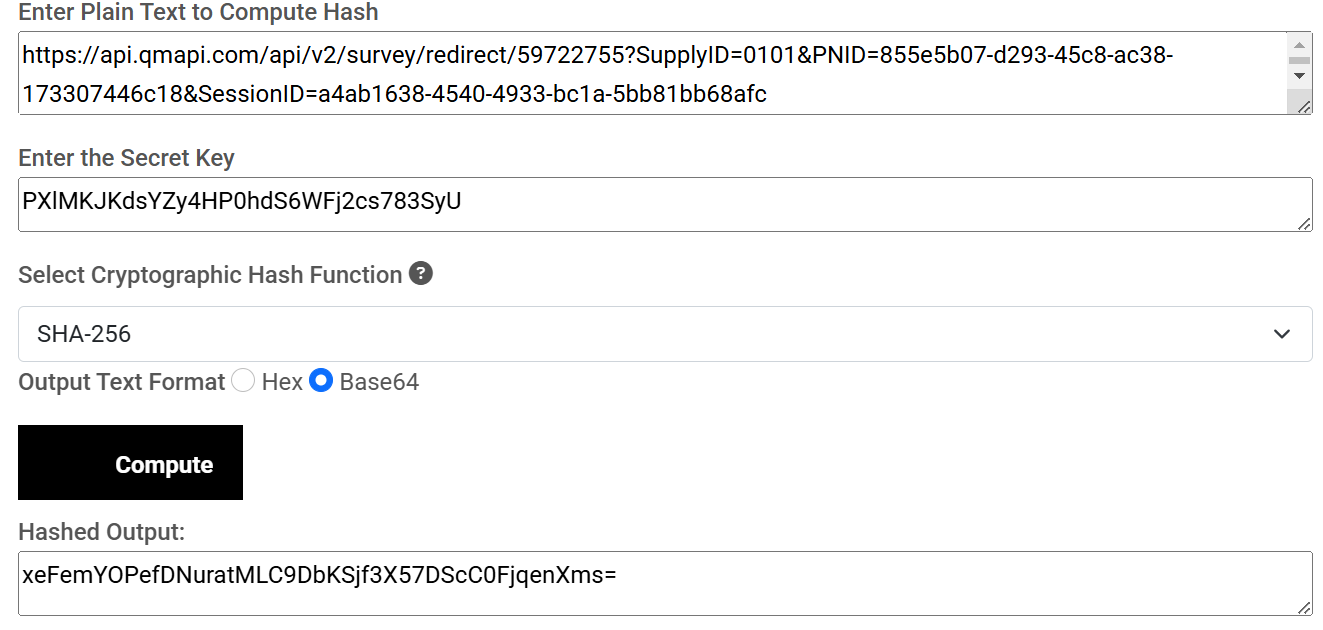 Then, encode this Hashed value to use .replace('+', '%2B').replace('/', '%2F').replace('=', '%3D') and retrieve the token value(TID)."
After Replacement, you will get the below value, Now Put Below value in the Takone Value(TID).
Then, encode this Hashed value to use .replace('+', '%2B').replace('/', '%2F').replace('=', '%3D') and retrieve the token value(TID)."
After Replacement, you will get the below value, Now Put Below value in the Takone Value(TID).

- This is the final URL

QMAPI User Experience
To optimize the respondent experience and ensure they are matched with the most suitable survey opportunities, Qmapi streamlines the entire process for our Supply Partners. Once API integration is complete, respondents first go through a pre-screening step where a few essential qualifying questions are asked.
This pre-screening minimizes respondent time spent on eligibility checks and accelerates their connection to relevant surveys.
While sending traffic to a particular survey, our top priority is ensuring that each respondent is a good match and can successfully complete the study.
We first attempt to match respondents to the intended survey using their profile data and pre-screening responses. If they do not qualify for that survey, we will automatically redirect them to an alternative study that best fits their profile. The payout for the new survey will be displayed in real time—both on the respondent’s landing page and in your dashboard.
By focusing on conversion rates based on best survey match, Qmapi ensures a seamless and intelligent matching process thus maximizing completion rates while keeping respondents engaged and satisfied.